
今天有个站长啦VIP赞助版的客户的空间商IIS7.5,伪静态是web.config的,目前站长啦VIP暂时没有配套的伪静态规则,怎么办呢?
如果是VPS或者服务器就好办了 ,以下是教程
apache和nginx的伪静态文件为.htaccess,但是在iis下伪静态规则需要写在web.config中。
iis中rewrite组件用来支持伪静态,其中一个功能可以将.htaccess中的规则转换为web.config实现伪静态。方法如下:
下载地址:http://www.iis.net/downloads/microsoft/url-rewrite#additionalDownloads
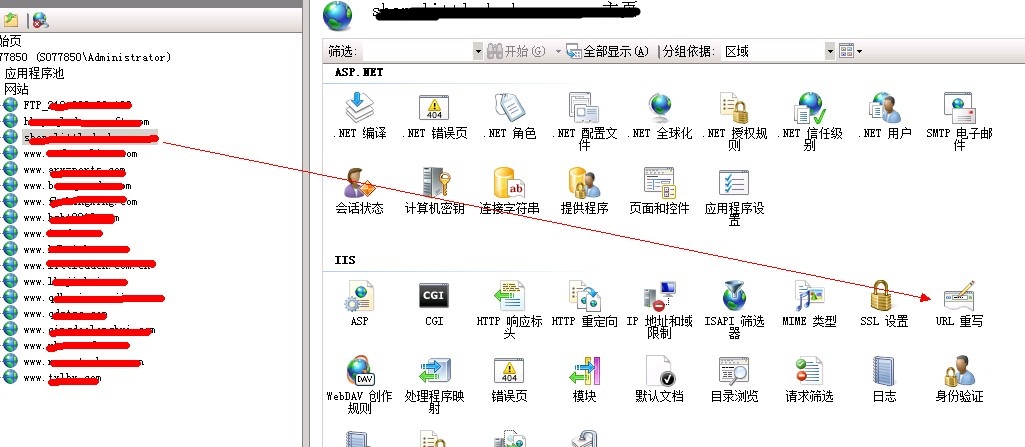
需要编辑哪个网站就选择那个站点,双击 URL重写。双击后如下

点击 导入规则
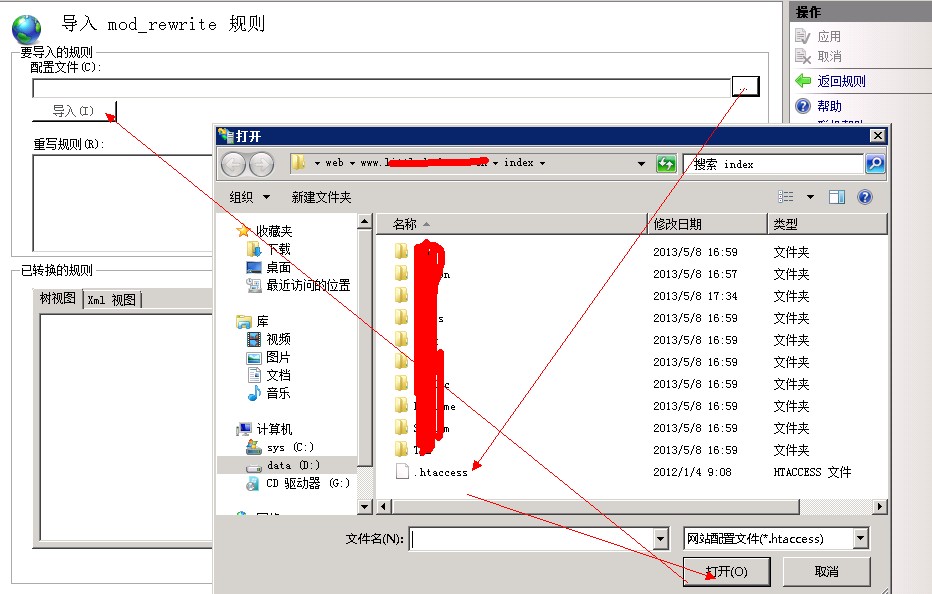
选择 .htaccess文件,将其导入。 导入后显示如下:
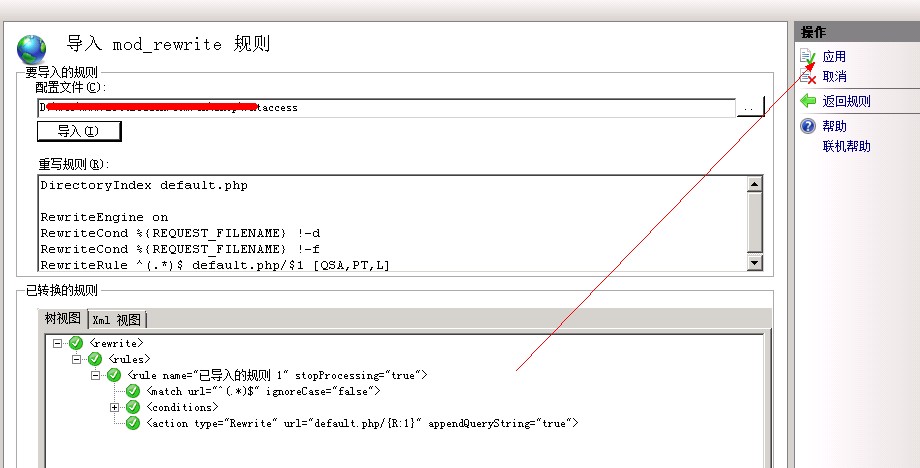
应用即可。这样就生效了。
其它伪静态规则如httpd.ini,.htaccess怎样转换为web.config iis7/8用
首先,在远程登录上去,安装URL Rewrite,一般的没有安装,此模板的下载地址:http://www.iis.net/downloads/microsoft/url-rewrite 还要安装msrewriting,也就是这个:MSDNURLRewriting.msi,下载地址 百度上找下,
2、打开IIS7/8管理工具,选择要配置的网站,当然这里也可以将规则文件转换,并给提供没有安装IIS7的主机使用。
3、双击打开网站主页,选择“URL Rewrite”模块。 双击打开网站主页,选择“URL Rewrite”模块双击打开网站主页,选择“URL Rewrite”模块
4、进入“URL Rewrite”模块详情,选择导入规则。 进入“URL Rewrite”模块详情,选择导入规则进入“URL Rewrite”模块详情,选择导入规则
5、进入“导入”详情页面,点击“导入”按钮后选择Apache的规则文件.htaccess或第三方伪静态ISAPI的http.ini。 转化Apache、第三方伪静态ISAPI的伪静态规则 转化Apache、第三方伪静态ISAPI的伪静态规则
6、导入成功后,在右侧栏目选择“应用”保存到web.config配置文件。 web.config配置文件放到网站目录下面,拿到web.config之后,也就可以放到没有安装iis7的主机上使用了,某些的服务商,不给用户转换,只能靠这种办法了。
版权与免责声明:
凡注明稿件来源的内容均为转载稿或由网友用户注册发布,本网转载出于传递更多信息的目的;如转载稿涉及版权问题,请作者联系我们,同时对于用户评论等信息,本网并不意味着赞同其观点或证实其内容的真实性;
![英雄棋士团(预下载)?=$bqr['banben']?>](http://shouyouimg.cnzzla.com/d/file/shouyoupic/yingxiongqishituanyuxiazai.jpg)
![美食小当家?=$bqr['banben']?>](http://shouyouimg.cnzzla.com/d/file/shouyoupic/meishixiaodangjia.png)
![2047?=$bqr['banben']?>](http://shouyouimg.cnzzla.com/d/file/shouyoupic/2047.jpg)
![荣誉指挥官(预下载)?=$bqr['banben']?>](http://shouyouimg.cnzzla.com/d/file/shouyoupic/rongyuzhihuiguanyuxiazai.png)
![繁荣美食市场物语?=$bqr['banben']?>](http://shouyouimg.cnzzla.com/d/file/shouyoupic/fanrongmeishishichangwuyu.jpg)
![夸克浏览器 v4.2.1.138 好用的手机浏览器?=$bqr['banben']?>](http://shouyouimg.cnzzla.com/d/file/appimg/202007/kuakezuolanqi.jpg)
![移动办公软件 OfficeSuite Premium v10.18.28716 内购解锁版?=$bqr['banben']?>](http://shouyouimg.cnzzla.com/d/file/appimg/202007/yidongbangongruanjian.jpg)
![乐秀视频编辑器 VideoShow v8.8.4 内购解锁版?=$bqr['banben']?>](http://shouyouimg.cnzzla.com/d/file/appimg/202007/lexiushipinbianjiqi.png)
![X 浏览器 v3.3.9 一款小巧的安卓浏览器?=$bqr['banben']?>](http://shouyouimg.cnzzla.com/d/file/appimg/202007/x.jpg)
![安卓密码管理软件 Enpass v6.4.5.368 内购解锁版?=$bqr['banben']?>](http://shouyouimg.cnzzla.com/d/file/appimg/202007/anzhuomimaguanliruanjian.jpg)
![差分复制同步 FastCopy-M v3.6.3.51 绿色便携版?=$bqr['banben']?>](http://shouyouimg.cnzzla.com/d/file/softimg/FastCopy3.png)
![多标签页拓展 Clover v3.5.2 Build 19809 精简绿色版?=$bqr['banben']?>](http://shouyouimg.cnzzla.com/d/file/softimg/Clover.png)
![文件重命名 Advanced Renamer v3.85 Lite 绿色便携版?=$bqr['banben']?>](http://shouyouimg.cnzzla.com/d/file/softimg/Advanced_Renamer.png)
![网络防火监控 GlassWire Elite v2.1.166 绿色便携版?=$bqr['banben']?>](http://shouyouimg.cnzzla.com/d/file/softimg/GlassWire.png)
![影音播放器 Daum Potplayer v1.7.20538 美化便携版?=$bqr['banben']?>](http://shouyouimg.cnzzla.com/d/file/softimg/PotPlayer.png)


