
[船说]杰奇小说系统+船说站群系统3.6一起配合的搭建图文教程
1、远程数据库设置:
\shipsay\class文件夹
2、伪静态
Nginx 伪静态
rewrite ^/sitemap/sitemap_([0-9]+).xml$ /sitemap/ss_sitemap.php?page=$1;
rewrite ^/sitemap/sitemap.xml$ /sitemap/ss_sitemap.php;
rewrite ^/sitemap/sm_sitemap_([0-9]+).xml$ /sitemap/sm_sitemap.php?page=$1;
rewrite ^/sitemap/sm_sitemap.xml$ /sitemap/sm_sitemap.php;
if (!-d $request_filename){
set $rule_0 1$rule_0;
}
if (!-f $request_filename){
set $rule_0 2$rule_0;
}
if ($rule_0 = "21"){
rewrite ^/(.*)$ /index.php last;
}
--------------------------------------
IIS 伪静态
<?xml version="1.0" encoding="UTF-8"?>
<rules>
<rule name="ShipSay SiteMap for page">
<match url="^sitemap/sitemap_([0-9]+).xml$" ignoreCase="false" />
<action type="Rewrite" url="sitemap/ss_sitemap.php?page={R:1}" appendQueryString="false" />
</rule>
<rule name="ShipSay SiteMap for index">
<match url="^sitemap/sitemap.xml$" ignoreCase="false" />
<action type="Rewrite" url="sitemap/ss_sitemap.php" />
</rule>
<rule name="ShipSay SiteMap for page">
<match url="^sitemap/sm_sitemap_([0-9]+).xml$" ignoreCase="false" />
<action type="Rewrite" url="sitemap/sm_sitemap.php?page={R:1}" appendQueryString="false" />
</rule>
<rule name="ShipSay SiteMap for index">
<match url="^sitemap/sm_sitemap.xml$" ignoreCase="false" />
<action type="Rewrite" url="sitemap/sm_sitemap.php" />
</rule>
<rule name="ShipSay CMS" stopProcessing="true">
<match url="^(.*)$" ignoreCase="false" />
<conditions logicalGrouping="MatchAll">
<add input="{REQUEST_FILENAME}" matchType="IsDirectory" ignoreCase="false" negate="true" />
<add input="{REQUEST_FILENAME}" matchType="IsFile" ignoreCase="false" negate="true" />
</conditions>
<action type="Rewrite" url="index.php" appendQueryString="true" />
</rule>
</rules>
--------------------------------------
Apache 伪静态: 无需设置.
3、开启缓存加快速度
船说CMS3.6如何开启Redis 缓存
直接在网站后台开启Redis 缓存参数设置
然后在宝塔面板找到redis 点击安装,然后再卸载
船说CMS必须安装5.0.8才能用,需要需要修改版本!Redis是一个高性能的key-value数据库(PHP连接redis,需PHP设置中安装redis扩展) 部分Centos7系统仅支持安装5.x版本!
宝塔指定redis版本安装教程
1.先在面板安装默认redis 然后卸载
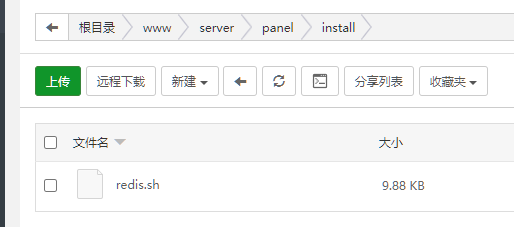
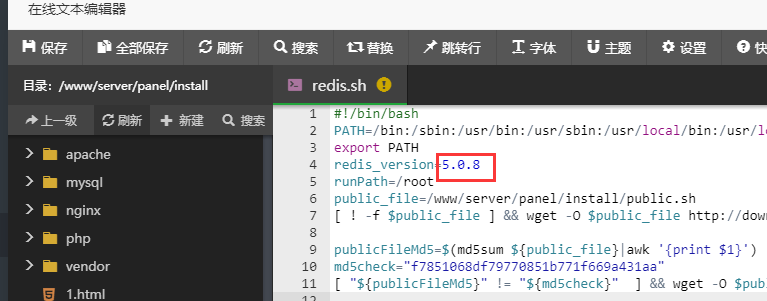
2.修改/www/server/panel/install/redis.sh文件
指定版本 图例中指定为5.0.8 修改后保存
3.连接ssh 执行以下命令安装redis即可(root权限)
bash /www/server/panel/install/redis.sh install
版权与免责声明:
凡注明稿件来源的内容均为转载稿或由网友用户注册发布,本网转载出于传递更多信息的目的;如转载稿涉及版权问题,请作者联系我们,同时对于用户评论等信息,本网并不意味着赞同其观点或证实其内容的真实性;
![英雄棋士团(预下载)?=$bqr['banben']?>](http://shouyouimg.cnzzla.com/d/file/shouyoupic/yingxiongqishituanyuxiazai.jpg)
![美食小当家?=$bqr['banben']?>](http://shouyouimg.cnzzla.com/d/file/shouyoupic/meishixiaodangjia.png)
![2047?=$bqr['banben']?>](http://shouyouimg.cnzzla.com/d/file/shouyoupic/2047.jpg)
![荣誉指挥官(预下载)?=$bqr['banben']?>](http://shouyouimg.cnzzla.com/d/file/shouyoupic/rongyuzhihuiguanyuxiazai.png)
![繁荣美食市场物语?=$bqr['banben']?>](http://shouyouimg.cnzzla.com/d/file/shouyoupic/fanrongmeishishichangwuyu.jpg)
![夸克浏览器 v4.2.1.138 好用的手机浏览器?=$bqr['banben']?>](http://shouyouimg.cnzzla.com/d/file/appimg/202007/kuakezuolanqi.jpg)
![移动办公软件 OfficeSuite Premium v10.18.28716 内购解锁版?=$bqr['banben']?>](http://shouyouimg.cnzzla.com/d/file/appimg/202007/yidongbangongruanjian.jpg)
![乐秀视频编辑器 VideoShow v8.8.4 内购解锁版?=$bqr['banben']?>](http://shouyouimg.cnzzla.com/d/file/appimg/202007/lexiushipinbianjiqi.png)
![X 浏览器 v3.3.9 一款小巧的安卓浏览器?=$bqr['banben']?>](http://shouyouimg.cnzzla.com/d/file/appimg/202007/x.jpg)
![安卓密码管理软件 Enpass v6.4.5.368 内购解锁版?=$bqr['banben']?>](http://shouyouimg.cnzzla.com/d/file/appimg/202007/anzhuomimaguanliruanjian.jpg)
![差分复制同步 FastCopy-M v3.6.3.51 绿色便携版?=$bqr['banben']?>](http://shouyouimg.cnzzla.com/d/file/softimg/FastCopy3.png)
![多标签页拓展 Clover v3.5.2 Build 19809 精简绿色版?=$bqr['banben']?>](http://shouyouimg.cnzzla.com/d/file/softimg/Clover.png)
![文件重命名 Advanced Renamer v3.85 Lite 绿色便携版?=$bqr['banben']?>](http://shouyouimg.cnzzla.com/d/file/softimg/Advanced_Renamer.png)
![网络防火监控 GlassWire Elite v2.1.166 绿色便携版?=$bqr['banben']?>](http://shouyouimg.cnzzla.com/d/file/softimg/GlassWire.png)
![影音播放器 Daum Potplayer v1.7.20538 美化便携版?=$bqr['banben']?>](http://shouyouimg.cnzzla.com/d/file/softimg/PotPlayer.png)


